
Projects
Published on July 16, 2026
The problem: repeating context in every conversation
When you use AI for a recurring topic, you end up repeating the same instructions in every new conversation:
- "You are a copywriter specializing in B2B marketing, you write in a professional but approachable tone..."
- "Here is my lease agreement, I'm going to ask you questions about it..."
- "I'm working on a React app with TypeScript, here's the architecture..."
With each new discussion, you have to re-paste the same context, re-upload the same document, re-explain the same framework. It's tedious, easy to forget, and you lose consistency between conversations: sometimes you specify the tone, other times you forget, and the results vary.
This problem gets worse when you work on multiple topics in parallel. Your blog conversations mix with those about the contract, which mix with those about the code. Your history becomes an undifferentiated stream where everything sits at the same level.
The solution: a dedicated space with persistent context
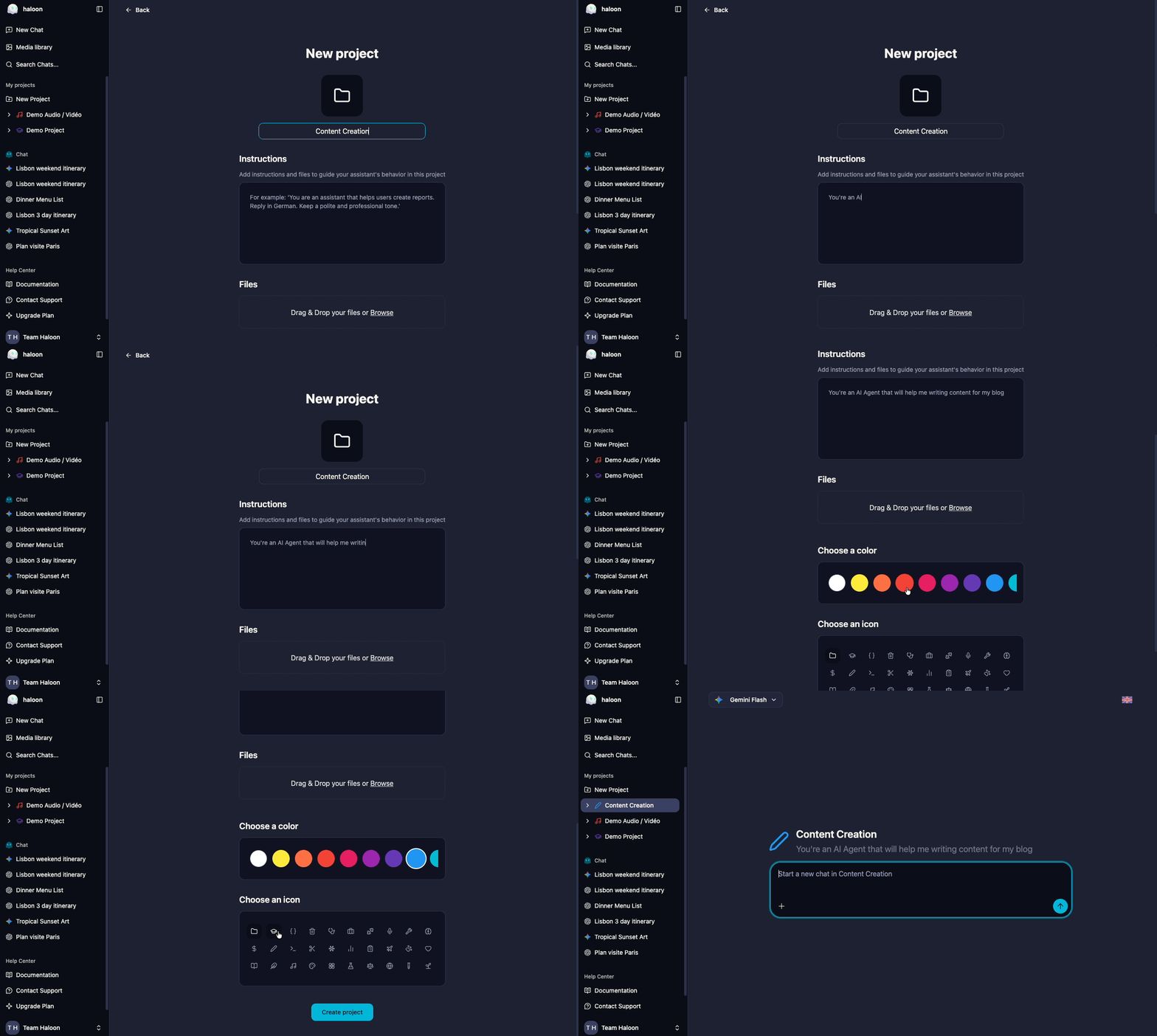
A project on Haloon groups your conversations around a theme and automatically applies a shared context to all of them.
What a project is
A project consists of three elements:
A visual identity: a name, a color, and an icon. You instantly recognize each project in the sidebar without having to read the titles.
A system prompt: instructions that automatically apply to all conversations in the project. The AI model receives them before each of your messages, without you having to repeat them.
Reference documents: PDFs, images, or other files you attach to the project. They are sent as context to every conversation, as if you re-uploaded them each time.
How to create a project
- In the sidebar, click New project
- Give it a name, choose a color and an icon
- Write your system prompt (the permanent instructions for the AI)
- Add your reference documents if needed (PDFs, images, etc.)
Every new conversation created in this project will automatically inherit the system prompt and documents.
How it works
When you open a conversation in a project:
- The project's system prompt is sent to the model before each request. You don't need to mention or remind it.
- Attached documents are sent as context. The model can read, analyze, and refer to them in its responses.
- You can still add conversation-specific context on top of the project context.
The result: every conversation in the project starts with the right framework, with no effort on your part.
Concrete use cases
Create consistent visuals for your blog
The problem: you generate images for your blog posts, but each time you have to re-describe the desired style. The result lacks visual consistency from one article to the next.
With a project: create a "Blog - Visuals" project with a system prompt describing your visual guidelines:
You generate illustrations for a tech blog. Style: minimalist flat design, dark blue / white / coral accent palette, no text in the image, 16:9 format, solid or subtle gradient background.
Every image generated in this project will automatically follow these guidelines. You get visual consistency with no effort.
Analyze a document without re-uploading it
The problem: you have a 30-page contract and want to ask questions about it over several days. With each new conversation, you have to re-upload the PDF and re-explain the context.
With a project: create a "Lease Agreement" project, upload the PDF as a reference document, and add a system prompt:
You are a legal assistant. You analyze the lease agreement attached to this project. Answer precisely, citing the relevant clauses. Flag any unusual or potentially unfavorable terms.
Open as many conversations as you need in this project: the contract and instructions are always there.
Code with your application's context
The problem: you use AI for coding and constantly have to re-explain your tech stack, coding conventions, and architecture.
With a project: create a project for your application with a system prompt describing your environment:
React 19 + TypeScript + Tailwind application. Architecture: pages / components / hooks / stores (Zustand). Conventions: snake_case for variables, CamelCase for components, no semicolons, double quotes.
The AI knows your context from the very first line of every conversation.
Prepare a course or training
The problem: you're preparing a course and need the AI to know the syllabus, the students' level, and the expected format for each exercise.
With a project: upload the course syllabus as a reference document and add a system prompt:
You help me prepare an introductory Python course for first-year students. Beginner level, no prerequisites. Format: short explanation + commented code example + exercise with solution.
Every conversation in the project produces content consistent with the syllabus and target level.
Manage your social media content
The problem: you create content for LinkedIn or Twitter and each time you have to re-specify your tone, target audience, and the type of posts you publish.
With a project: create a "LinkedIn" project with a system prompt framing your editorial line:
You help me write LinkedIn posts. My audience: developers and CTOs at startups. Tone: direct, concrete, no corporate jargon. Format: hook in the first line, 3-5 short paragraphs, a call for discussion at the end. No excessive emojis.
Every post generated in this project follows your editorial line without you having to remind it.