
Global Search
Published on July 16, 2026
The problem: finding a conversation in a sea of discussions
When you use AI daily, the number of conversations grows fast. Within a few weeks, you have hundreds of discussions with different models, on various topics, at different dates.
The result: you know you already asked a question or got a useful answer, but you can't find it anymore. You end up asking the same question again, or worse, giving up and looking for the information elsewhere.
And the more models you use (GPT, Claude, Gemini, Mistral...), the more scattered your conversations become. A simple chronological history is no longer enough.
The solution: a search engine across your entire history
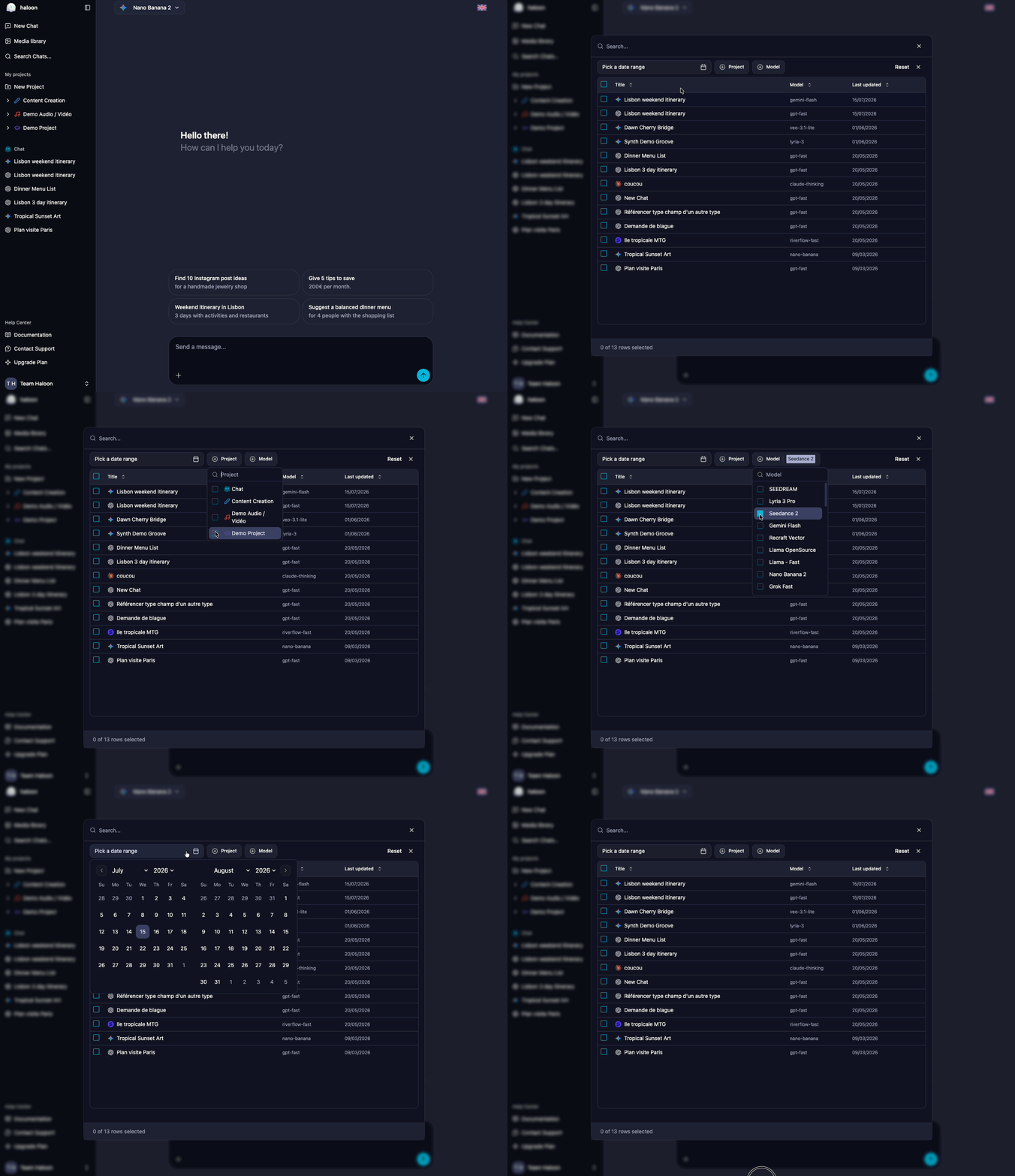
Haloon's global search gives you instant access to all your conversations, regardless of the model used, the associated project, or the date.
How to access it
Two options:
- Keyboard shortcut: press Ctrl+K (or Cmd+K on Mac) from any screen
- Menu: click the Search button in the sidebar
The search window opens immediately, ready for your query.
Search criteria
You can filter your conversations along four axes, which can be combined:
| Criterion | What it does | Example |
|---|---|---|
| Full-text search | Searches within message content (your prompts and responses) | "chocolate cake recipe" |
| Model | Filters by the AI model used | All conversations with Claude Sonnet |
| Project | Filters by associated project | Only discussions from the "Blog" project |
| Time period | Filters by date | Last week's conversations |
These filters combine. For example, you can search for all conversations with Claude in the "Marketing" project that contain the word "landing page", from June.
Bulk actions
Search isn't just for finding conversations. You can also act on the results:
- Delete: select multiple conversations and delete them in one click. Great for cleaning up your history.
- Move to a project: select conversations and move them to an existing project. Useful for retroactively organizing discussions you hadn't sorted initially.
Concrete use cases
Find a piece of code
You asked a model to write a function three weeks ago, but you don't remember which model or which conversation. Type a keyword from the code (the function name, the language, a comment) and the search takes you directly to the right discussion.
Compare responses from different models on a topic
You asked the same question to GPT, Claude, and Gemini at different times. Search by text to find all occurrences and compare the responses side by side.
Clean up your history
After a few months of use, you've accumulated hundreds of test or draft conversations. Filter by time period, select in bulk, and delete.
Reorganize your projects
You recently started using projects and want to sort your old conversations. Search by topic, select the relevant conversations, and move them to the right project in a single action.
Find a prompt that worked well
You got a perfect result two weeks ago, but you don't remember the exact prompt you used. Search by keywords in the content to find the exact message and reuse it.